.png)
Understanding Bitcoin Network Fees
Similar to the Hardblock network fees article. It should break down how Bitcoin fees work (mempool congestion, vbytes, fee estimation), why collaborative custody involves on chainfees. Explain what users can expect during vault creation, spending, rollover, and unilateral exit and the different fee rates (normal, fast, manual)
When you send bitcoin out of a GuardBlock vault (via viewing your vault page and then clicking 'Withdraw'), you create an on-chain Bitcoin transaction.
Transacting on the Bitcoin network requires paying a fee to the miners who secure the Bitcoin network and confirm transactions. Bitcoin actually lands in the recipient's wallet when the transaction gets confirmations on the network, which means that the transaction will be included in a block on the bitcoin blockchain.
The transaction fee is based on the amount of demand for block space on the bitcoin network. High transaction volumes (or network congestion) implies that the transaction fee will be higher than baseline.
When and Why do I need to make bitcoin transactions while using GuardBlock?
When using GuardBlock, you will make on-chain bitcoin transactions for a variety of reasons:
- When depositing bitcoin into a GuardBlock Vault
- When withdrawing bitcoin from a GuardBlock Vault
- When performing a rollover (to refresh your Vault Timelock)
- When performing a unilateral exit from the platform
Even though you may be using a private key and addresses that already have your bitcoin in it that you intend to secure with GuardBlock, you still need to make a transaction on the bitcoin network in order to move that bitcoin into your GuardBlock Vault, which is what enables your recovery pathways.
How does an incoming transaction work with GuardBlock?
When you deposit bitcoin into your GuardBlock vault, its as simple as logging in, selecting your Vault, copying the latest deposit address displayed and inputting it into your bitcoin wallet or custodian's platform in order to send bitcoin.
Take your time to understand the specific methodology of sending bitcoin from the platform you're using. If in doubt, you can always send a smaller amount first before the entire balance to check things, but note that your sending platform will levy a transaction fee each time you send bitcoin through the bitcoin network.
You will need to review your platform's docs to understand what fee they might charge for your transfers. To get a general idea, you can visit a blockchain explorer such as mempool.space in order to view current bitcoin network fees.
Once the bitcoin arrives, you will see your balance increase, and the entry will appear in the Transaction History section of your vault.
How does an outgoing transaction work with GuardBlock?
As soon as you send bitcoin using your vault, but before the transaction is confirmed into a block, it is technically 'out' of your vault. The Bitcoin algorithm is designed so that none of the transactions within a network can be reversed, revoked, recalled, or undone in any other way by anyone, other than the protocol itself: such as when a transaction does not make it to the block as a result of being purged from the mempool due to the fee rate being too low.
This guarantees the network's stability and integrity. It is important to ensure all details are correct before submitting a transaction, as once submitted it cannot be stopped or reversed.
When you see a TX ID number for your Bitcoin transaction (which is displayed by clicking the eye icon on your GuardBlock vault page under Transaction History), the Bitcoin is out of the vault and held in the waiting pool, and no further action needs to be taken.
Bitcoin does not arrive in the recipient's wallet until it gets confirmations - once confirmations occur as the transaction propagates through the network, the bitcoin will appear in the recipient wallet.
What are the transaction sending options for GuardBlock vaults?
GuardBlock charges a market rate fee to cover the costs involved with submitting a transaction to the bitcoin network from your vault. This fee rate changes depending on the option you choose when creating the transaction.
When sending bitcoin from your vault, you have the option of choosing normal, fast or manual:
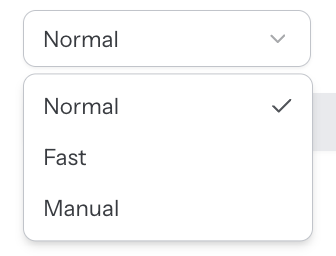
Typically, you can choose Normal transaction speed when you prefer a cheaper transaction fee and are less time sensitive.
Depending on Bitcoin network congestion it should generally confirm in the next 3 blocks. One block is usually processed within around 10 minutes, but it could take from 1-2 minutes to potentially an hour.
However, on VERY rare occasions transactions can take over a day to confirm. This is when demand for transactions rises quickly causing a spike in transaction fees. As the congestion reduces, the fee rate drops, and your transaction will eventually be processed.
Choose Fast when speed is your priority. Fast transactions will generally be processed in the next block, which is generally within 10 minutes, but could take up to an hour. Again, on very rare occasions (ie once or twice per year) your transaction could take over a day to confirm.
Finally, we provide a Manual option where you can choose the fee rate you want to use for the transaction. This is an advanced feature that we only recommend using if you know what you're doing.
If you choose Manual, you then input a number which corresponds to sats per virtual byte (recall that 1 BTC = 100 million satoshi, or sats). If you use this feature we highly recommend you check a blockchain explorer such as mempool.space and view the current free rate before confirming your amount and submitting the transaction.
What are the transaction costs for each sending option?
Bitcoin fees are determined by two components:
- The fee rate (measured in Satoshis per Virtual Byte or Sat/vB)
- The size of the transaction, measured in virtual bytes.
We source our fee rates from mempool.space.
- Normal uses "Medium Priority"
- Fast uses "High Priority"
This screenshot shows how the state of mempool fees at the time of writing this article:
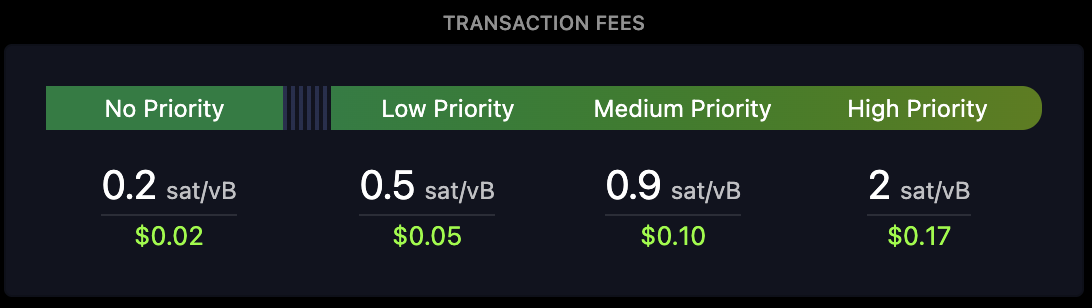
You can verify that we are charging the correct transaction fee by choosing sending type (Normal, Fast or Manually inputting a figure) and then compare it with the transaction fees shown on mempool.space or some other blockchain explorer or fee estimation service.
The size of a transaction varies due to several factors including the bitcoin address type and how many inputs are required. For simplicity, we charge a fixed 200 vBytes per transaction.
For a normal transaction, we multiply 200 by the Medium Priority fee rate from mempool.space plus 0.02 (the additional fractional amount prioritises the transaction above anyone who is just using the Medium Priority fee).
If the Medium Priority fee on mempool.space is currently 1 Sat/vB, then our fee will be:
(1 + 0.02) * 200 = 204 Satoshis (or 0.00000204 bitcoin, which is AUD $0.24 at time of writing).
The value of this fee in Australian dollars will vary based on the price of bitcoin. The Australian dollar fee is displayed in brackets next to the transaction fee.
What are the transaction fees involved with Rollover transactions?
A rollover transaction is typically done every 12 months in order to refresh your timelock.
Similar to sending bitcoin using your vault, you are able to choose Normal, Fast or Manual for the rollover.
Refer to the previous section above to see the cost breakdown for each option. At the prices at time of writing, a Normal rollover transaction would cost 204 Satoshis, or 0.00000204 BTC, which is AUD $0.24 as of May 2026.
What are the transaction fees involved with Exit transactions?
A unilateral exit transaction is used when you want to leave GuardBlock and move all of your bitcoin out of a vault.
This can be done without logging into GuardBlock. You simply use your private key and vault descriptor in Liana Wallet, and initiate a transaction to move the bitcoin to a new address of your choosing.
The transaction fee will be shown in the Liana wallet software and will typically be similar to the transaction fees discussed above.